Россия, р.п. Красные Баки


СДЕЛАЙТЕ СВОИ УРОКИ ЕЩЁ ЭФФЕКТИВНЕЕ, А ЖИЗНЬ СВОБОДНЕЕ
Благодаря готовым учебным материалам для работы в классе и дистанционно
Скидки до 50 % на комплекты
только до
Готовые ключевые этапы урока всегда будут у вас под рукой
Организационный момент
Проверка знаний
Объяснение материала
Закрепление изученного
Итоги урока
Была в сети 23.09.2026 19:58
Воронина Марина Владимировна
преподаватель английского и немецкого языка, преподаватель информатики
 90 370
 196
196 
Местоположение
Специализация
Методические указания 2 курс 4 часть (ИСиП) 2025
Категория:
Английский язык
11.06.2025 19:48

Просмотр содержимого документа
«Методические указания 2 курс 4 часть (ИСиП) 2025»
МИНИСТЕРСТВО ЛЕСНОГО ХОЗЯЙСТВА
И ОХРАНЫ ОБЪЕКТОВ ЖИВОТНОГО МИРА НИЖЕГОРОДСКОЙ ОБЛАСТИ
Государственное бюджетное профессиональное
образовательное учреждение Нижегородской области
«КРАСНОБАКОВСКИЙ ЛЕСНОЙ КОЛЛЕДЖ»
(ГБПОУ НО «КБЛК»)
МЕТОДИЧЕСКИЕ УКАЗАНИЯ
по дисциплине «Иностранный язык
в профессиональной деятельности (Английский язык)»
для студентов II курса часть 4
Тема 6 Компьютеры и их функции
для специальности 09.02.07 Информационные системы и программирование
Составили:
преподаватели
иностранного языка
Воронина М.В.,
Булкина Т.А.
Красные Баки
2025 год
Lesson 7
Types of computers
№1. Read and translate the text. Write out the unknown words:
In the digital era, computers are the integral part of our human being. Nowadays we use computer in every aspect in or daily live activities starting from Medical science, security, calculation, and research and not only personal use. A single type of computer is into sufficient to fulfill all the needs. As a result, the technology is advanced, and different types of computer are introduced for fulfilling the needs.
A computer is a device that converts data into usable information. It processes the input in accordance with the set of instructions supplied by the user and produces the intended output. The term computer is derived from the English word ‘compute,’ which means “to calculate”, “to solve”. Based on the requirements, computers are being designed to perform efficiently. There are various computer types based on computer size and data handling capabilities. All newly created computers have unique characteristics and designs. There are five different types of computers based on size, and three other types of computers based on how well they can handle data.
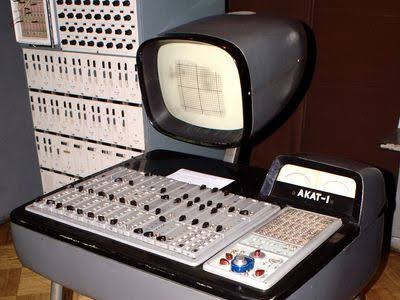 1. An analog computer is one that analyzes the issue at hand using the constantly changing elements of physical events. The processing of analog data is the purpose of analog computers. It is a form of continuously changing, continuous data that lacks discrete values. When consumers are unfamiliar with precise values for things like temperature, speed, current, and pressure, they employ these types of computers. This computer, without converting the information into a numerical value, can immediately accept data from the devices. The results are shown on a dial or scale after they continually measure changes in physical amount. Examples are mercury thermometers and speedometers.
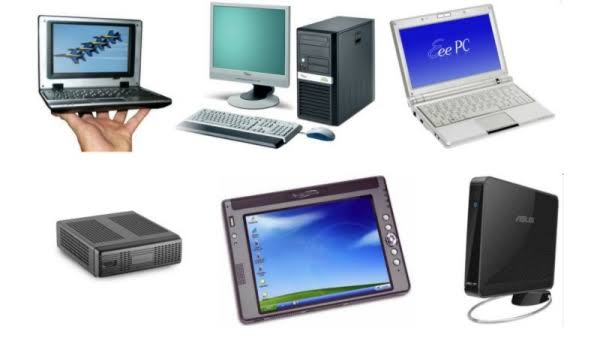 2. Digital Computer - this types of computer is used to execute calculations and logical operations at a very high speed. It accepts data in the form of binary integers (0 and 1) or digits as input and processes it using programmes and outputs the results. Users of digital computers can more readily update the system with the newest features. It is also capable of easily retrieving a vast amount of information stored. Modern digital computers include all laptops, desktops, and cellphones that we use at home or at the office.
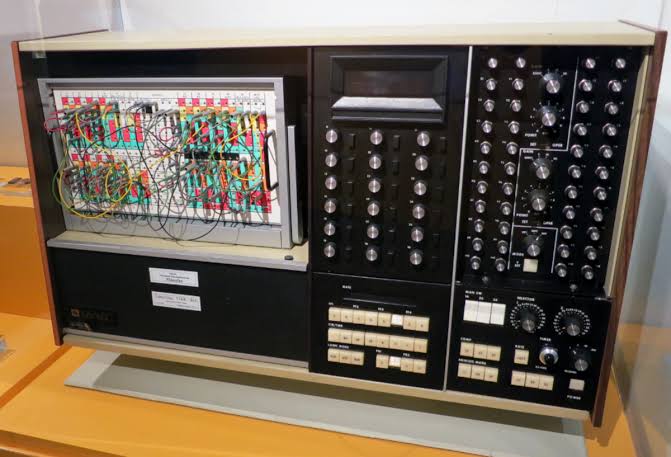 3. Hybrid Computer - computers that combine elements of both digital and analog computing are called hybrid computers. These types of computer have a speed that is comparable to analog computers and are exactly like digital computers in terms of precision and memory. The ability to process both discrete and continuous data is a feature of hybrid computers. Before processing, it receives analog signals and converts them to digital form. As a result, it is frequently employed in specialized applications that process both analog and digital data.
On the basis of size, there are 5 types of computer can be found.
 1. Supercomputer is the largest and fastest computers among all types of computers. Supercomputers are specifically built to process large volumes of data and perform large amounts of computation quickly. Roger Cray created the first supercomputer in 1976. Its thousands of interconnected processors allow it to process trillions of instructions in a matter of seconds. This includes weather forecasts, healthcare equipment, and nuclear research, among other things.
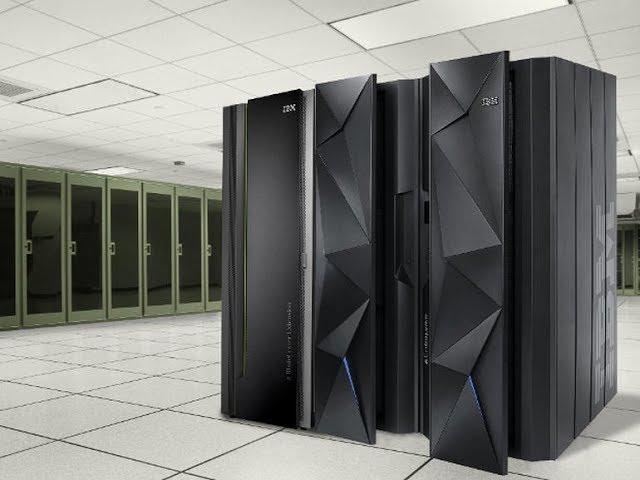 2. Mainframe is a multiprocessing computer that are built to support hundreds or thousands of users at the same time. This types of computer has two or more CPUs and may accommodate many people concurrently across its many terminals. Managing client statistics, census data, and other large amounts of data on a single device are among the main functions of this kind. In places like institutions or departments, minicomputers are utilized for a variety of tasks including billing, accounting, trading firms, inventory management, etc.
 3. Minicomputer is a types of computer that falls between a microcomputer and a mainframe computer. A minicomputer is a mid-range computer that is intermediate in size, power, speed, storage capacity, and so on. This computer has two CPUs and can support up to 200 people at once. They are extensively utilized in institutes and departments for accounting-related duties.
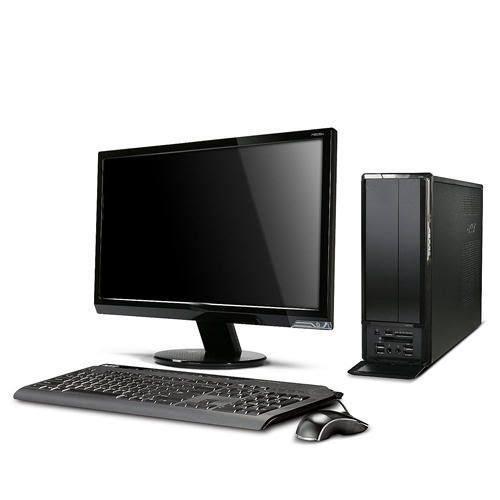 4. Personal Computer (PC), often known as a microcomputer, is a general-purpose computer built for individual use. Personal computers are low-cost computers that have a microprocessor as the central processing unit, memory, storage space, an input unit, and an output device. These computers have little circuitry mounted on a single circuit board. Desktop, laptop, and more examples are available.
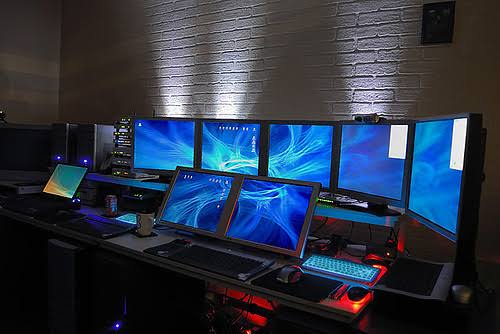 5. A workstation computer is a single-user computer that is typically employed to do a specific task accurately for technical or scientific applications. Workstations include a fast microprocessor, a big quantity of RAM, network capability, a graphical user interface, and a high-speed graphics adapter. Workstation computers are capable of doing heavy-duty tasks. Animation, CAD, audio and video editing, professional gaming, and so on. Apple PowerBook G4, MIPS CPU, SPARC CPU, and other similar computers are examples of this types of computer.
№2. Answer the questions:
1) What is a computer?
2) What does the term computer mean?
3) How many types of computers are based on size?
4) How many types of computers are based data-handling skills?
5) What is the difference between supercomputers and mainframes?
6) What is the difference between a personal computer and a workstation computer?
№3. Define whether these sentences are true or false. Correct the false ones:
1) A computer is a device that converts data into usable habits.
2) Computers are the integral part of our human being.
3) Mainframe has two or more CPUs.
4) Richard Crow created the first supercomputer in 1976.
5) Computers that combine elements of both digital and analog computing are called a workstation computer.
6) PC is often known as a microcomputer.
7) Modern digital computers include all laptops, desktops, and cellphones that we use at home or at the office.
№4. Match the word with their definitions:
| 1. desktop | a) a portable electronic device that allows users to make and receive calls and text messages through a cellular network |
| 2. laptop | b) combines elements of both digital and analog computing |
| 3. PDA | c) a multiprocessing computer that are built to support hundreds or thousands of users at the same time |
| 4. palmtop | d) a portable computer that uses a touchscreen as its primary input device |
| 5. mainframe | e) are capable of doing heavy-duty tasks |
| 6. tablet | f) a small, portable, and lightweight laptop computer that is designed primarily for internet browsing and basic computing tasks |
| 7. cellphone | g) a small, portable electronic device that fits in the palm of your hand |
| 8. netbook | h) a computer that is small enough to fit on a desk |
| 9. workstation computer | i) an electronic device that is designed to function as a handheld computer |
| 10. hybrid computer | j) a computer that is small enough to be carried around and used on your laps when you are sitting |
№5. Translate into English:
1) Миникомпьютер - это компьютер среднего класса, который отличается промежуточными размерами, мощностью, быстродействием, объемом памяти и так далее.
2) Тысячи взаимосвязанных процессоров позволяют ему обрабатывать триллионы инструкций за считанные секунды.
3) Перед обработкой он принимает аналоговые сигналы и преобразует их в цифровую форму.
4) В результате технология совершенствуется, и для удовлетворения потребностей появляются различные типы компьютеров.
5) Суперкомпьютеры специально созданы для обработки больших объемов данных и быстрого выполнения больших объемов вычислений.
№6. Translate into Russian:
The latest trend in computing is wearable (переносные) computers. Essentially, common computer applications (e-mail, database, multimedia, and calendar/scheduler) are integrated into watches, cell phones, visors and even clothing. Many other wearables target outdoors enthusiasts and fitness fanatics, allowing them to track their location, altitude, calories burned, steps, speed, and much, much more. Wearables are indeed a new horizon in personal computing. Their flexibility and mind-warping potential speak to the idea that the computer revolution isn't over. If anything, the PC era might just be getting underway.
№7. Write out 10 plural nouns from the text and translate them.
№8. Choose the correct adjective and fill in the gaps with the correct form of it:
1) Laptops are … than desktop computers, but … than notebooks. light / heavy
2) The mainframe is the … type of computer. A minicomputer is … than a microcomputer. large / small
3) Personal computers are … than mainframes but mainframes are … than personal computers at processing very large amounts of data. common / good
4) Minicomputers are … than mainframes but they are also … . powerful / expensive
5) New computers are … and sometimes … than older machines. fast / cheap
6) Laptops are often … than PCs but they are not as … . powerful / expensive
№9. Write out 5 Irregular verbs and 5 Regular verbs from the text. Write 4 forms of the verbs and translate them.
№10. Write what these abbreviations mean:
PC, CPU, RAM, ROM, CAD, PDA, OS, USB, DVD, CD, DOS, HDD, VPN, IP
Lesson 8
Passive Voice
№1. Study the material “Passive Voice”:
В английской грамматике существует два залога: действительный (активный) и страдательный (пассивный). Если подлежащее само выполняет действие, мы относим его к категории действительного залога, например, «мама часто печет пироги». В предложении видно, кто именно выполняет действие, поэтому мы переводим его в одном из времен действительного залога, в данном случае - в настоящем простом времени - “mother often bakes cakes”.
Рассмотрим другое предложение, например, «мне часто звонят», или «мне подарили подарок». В данном случае, не ясно кто именно выполняет действие, т.е. звонит и дарит подарок. Не подлежащее выполняет действие, оно испытывает воздействие со стороны другого лица. В страдательном залоге внимание обращают на результат действия.
Для образования форм страдательного залога простых времен (Indefinite / Simple tenses) используется глагол to be + participle II (третья форма глагола). «To be» в данном случае является подвижной частью этой формулы, меняющей свою форму в зависимости от времени, лица и числа подлежащего, а причастие всегда остается неизменным.
В отрицательных предложениях частица not ставится после вспомогательного глагола, а если их несколько, то после первого из них.
В вопросительных предложениях вспомогательный глагол (или первый из них) выносится на место перед подлежащим.
Дополнение в предложении с глаголом-сказуемым в пассивном залоге употребляется с предлогом by или with. Это дополнение соответствует русскому дополнению в творительном падеже без предлога. Дополнение с предлогом by выражает действующее лицо или действующую силу. Дополнение с предлогом with выражает орудие действия.
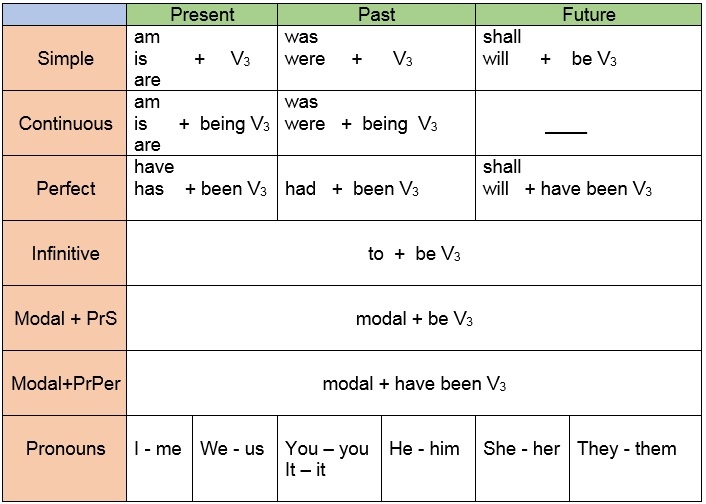
В страдательном залоге не употребляются следующие глаголы:
Непереходные глаголы, т.к. при них нет объекта, который испытывал бы какое-то воздействие (напр. live, work, arrive)
Глаголы-связки be (быть), become (становиться)
Глагол have
№2. Write the past participle of the following verbs:
want …………………………
buy …………………………
decide …………………………
marry …………………………
choose …………………………
drop …………………………
make …………………………
draw …………………………
№3. Change the underlined active verbs into the passive form:
Adam hit the ball. - The ball was hit by Adams.
Someone is ringing the bell. - The bell …………………………………….
Mom washes the carpet. - The carpet ………………… by Mom.
Children should drink milk. - Milk ……………………… by children.
I have paid my checks. - Checks …………………………… by me.
Tim will write a story. - A story ………………………… by Tim.
Tom needs to do this work. - This work needs ……………………….
Dina may invite some friends. - Some friends …………………………… by Dina.
№4. Change the following sentences from active into passive:
1. The lawyer will give you some advice.
2. Sue asked the policeman for directions.
3. The pirates had found the treasure.
4. Peter is going to take the package later.
5. Someone has already stopped the machine.
6. The coach always encourages the trainees.
7. Meg needs to wipe the floor right now.
8. The employees might suggest new rules.
№5. Change the following negative sentences from active into passive:
1. We didn’t notice the new changes.
2. The store won’t deliver the furniture.
3. They haven’t collected the taxes yet.
4. The students didn’t study the poem well.
5. We don’t accept credit cards here.
6. Tim wasn’t planting trees at seven.
7. You shouldn’t water this plant daily.
8. They are not interviewing the applicants.
№6. Change the following questions from active into passive:
1. Did the driver hit the boy yesterday?
2. Will the police question all the suspects?
3. Have you signed the house contract?
4. Do people speak English in Spain?
5. Who broke the vase in the sitting room?
6. Are you roasting chestnuts now?
7. Can you reach the top of this mountain?
8. Was Jim playing the piano very loudly?
№7. Read the text, write out 5 verbs in Passive Voice and translate them:
All computer systems, regardless of their size, have the same four hardware components: a processor or CPU, where the data input is processed according to the program; input/output devices or peripherals such as the keyboard and printer, which receive data from people and enter it into the computer for processing, then send it back to people so it can be used; storage components such as disk drives or tape drives keep data for later use; routing and control components, which direct the instructions and/or data from one component to the next making sure each does its task properly.
Computers are generally classified as general-purpose or special purpose machine. A general-purpose computer is one used for a variety of tasks without the need to modify or change it as the tasks change. A common example is a computer used in business that runs many different applications.
A special-purpose computer is designed and used only for one application. The machine may need to be redesigned and certainly reprogrammed, if, it is to perform another task. Special-purpose computers can be used in a factory to monitor a manufacturing process; in research to monitor seismological, meteorological and other natural occurrences; and in the office.
№8. Write 4 forms of each verb:
have, receive, be, process, send, use, keep, direct, make, classify, do, change, run, perform
№9. Find the synonyms to the following words:
system, to receive, device, to enter, application, to keep, example, to run, instruction, to perform
№10. Find the antonyms to the following words:
same, to receive, output, many, to keep, together, slow, to stop, loud, yesterday, new, here
Lesson 9
Computer System
№1. Read and translate the text. Write out the unknown words:
A computer is an electronic device used to process data, converting it into information that is useful to people. A complete computer system includes hardware, software, data, and people. Hardware consists of electronic devices, the parts you can see. Software, also known as programs, consists of organized sets of instructions for controlling the computer. Data consists of text, numbers, sounds, and images that the computer can manipulate.
The hardware, or physical components, of a computer consists of a processor, memory, input and output (I/O) devices, and storage. The processing function is divided between the processor and memory. The processor, or CPU, is the brain of the machine. Memory holds data and program instructions as the CPU works with them. The units of measure for memory are the byte, kilobyte, megabyte, gigabyte, and terabyte. The role of input devices is to provide data from the user or another source. The most common input devices are a keyboard and a mouse. The function of output devices is to present processed data to the user or to another computer. The most common output devices are a monitor and a printer. Communications devices, such as modems and network interface cards, perform both input and output functions, allowing computers to share information. Storage devices hold data not currently being used by the CPU. The most common storage devices are a floppy disk, a compact disk, a Digital Video Disk.
Programs are electronic instructions that tell the computer how to accomplish certain tasks. When a computer is using a particular program, it is said to be running or executing the program. The operating system tells the computer how to interact with the user and how to use the hardware devices attached to the computer. Application software tells the computer how to accomplish tasks the user requires. Some important kinds of application software are word processing programs, spreadsheets, database management software, presentation programs, graphics programs, multimedia applications, entertainment and education software, Web design tools and Web browsers, Internet applications, utilities, and networking and communications software.
№2. Answer the questions:
1) What does the term “computer” mean?
2) Are computers useful for people?
3) What does a computer system include?
4) What is the function of output devices?
5) Are some important kinds of application software a keyboard and a mouse?
№3. Translate the words with their definitions:
device - a piece of equipment that is used for a particular purpose
data - information in the form of text, numbers, or symbols that can be used by or stored in a computer
memory - the part of a computer where information and instructions are stored, or the amount of information that can be stored there
processor - the main part of a computer that controls all the other parts
storage - the amount of space a computer has for keeping information
byte - a unit for measuring the amount of information a computer can store, equal to 8 bits
floppy disk - a small disk inside a flat, square piece of plastic used in the past for storing information from a computer
spreadsheet - a computer program that helps you to do business calculations and planning
utility computing - a system of providing computing services in which a business owns computing power and the space to store data, which they sell to customers who use and pay for it based on how much they use
application - a computer program that is designed for a particular purpose
№4. Match the terms on the left with the explanations on the right.
| 1. Computer | a) a set of instructions for solving a specific problem by a computer |
| 2. CPU | b) performs the actual arithmetic and logical operations asked for by a program |
| 3. Hardware | c) manages and coordinates the entire computer system
|
| 4. Software | d) transmits coordinating signals and commands to the computer |
| 5. CU | e) holds the instruction from the memory while it is being executed |
| 6. ALU | f) the physical units that make up a computer system |
| 7. Register | g) keeps track of the next instruction to be performed in the main memory |
| 8. Program counter | h) programs and instructions executed by the computer |
| 9. Decoder | i) a machine for manipulating data according to a list of instructions |
| 10. Program | j) a tiny piece of silicon containing complex electronic circuits used inside all computers |
| 11. Chip | k) takes the coded instruction and breaks it down into individual commands necessary to carry it out |
№5. Choose the most suitable word for each description:
flame, file, boot, mouse, keyboard, modem, scanner, disk, upgrade
This small box is used to operate a computer.
A document on your computer.
A device which is used to transfer photos and texts to your computer.
To make a computer better or able to do more things.
This looks like a typewriter and has the keys you need to press.
It can be hard. It can be floppy.
A device which allows your computer to send messages along a telephone line.
An unfriendly or rude e-mail.
To start a computer.
№6. Define whether these statements are false or true:
1) Computer is made of electronic components so it is referred to as electronic device.
2) Computer has no intelligence until software is loaded.
3) There are four elements of computer system: hardware, software, diskettes and data.
4) Without software instructions hardware doesn't know what to do.
5) The software is the most important component because it is made by people.
6) The user inputs data into computer to get information as an output.
№7. Fill in the gaps the prepositions:
1) The function … output devices is to present processed data … the user or … another computer.
2) The processing function is divided … the processor and memory.
3) The processor, or CPU, is the brain … the machine.
4) It is a small disk … a flat, square piece … plastic used … the past … storing information … a computer
5) It is a piece … equipment that is used … a particular purpose.
№8. Translate from Russian into English:
1) Компьютерная система – это совокупность компьютера, периферийного оборудования и программного обеспечения, предназначенных для подготовки и решения задач пользователя.
2) Цель компьютерной системы – сделать процесс решения задачи на компьютере наиболее простым.
3) Компьютер – это программируемый автомат для обработки данных.
4) Внутренняя память – часть памяти компьютера, которая используется для хранения программ и данных во время решения задачи.
5) Внешняя память – часть памяти компьютера, которая используется для долговременного хранения программ и данных.
№9. Write antonyms for each word:
easy, expensive, useful, fast, hard, begin, open, break, found, buy, input, man, on, up, heat, south, never, fact, back
Lesson 10
Hardware
№1. Read and translate the text:
What is hardware? Webster's dictionary gives us the following definition of the hardware — the mechanical, magnetic, electronic, and electrical devices composing a computer system.
Computer hardware can be divided into four categories:
1) input hardware
2) processing hardware
3) storage hardware
4) output hardware.
Input hardware
The purpose of the input hardware is to collect data and convert it into a form suitable for computer processing. The most common input device is a keyboard. It looks very much like a typewriter. The mouse is a hand held device connected to the computer by small cable. As the mouse is rolled across the mouse pad, the cursor moves across the screen. When the cursor reaches the desired location, the user usually pushes a button on the mouse once or twice to signal a menu selection or a command to the computer.
The light pen uses a light sensitive photoelectric cell to signal screen position to the computer. Another type of input hardware is optic-electronic scanner that is used to input graphics as well as typeset characters. Microphone and video camera can be also used to input data into the computer. Electronic cameras are becoming very popular among the consumers for their relatively low price and convenience.
Processing hardware
The purpose of processing hardware is retrieve, interpret and direct the execution of software instructions provided to the computer. The most common components of processing hardware are the Central Processing Unit and main memory.
The Central Processing Unit (CPU) is the brain of the computer. It reads and interprets software instructions and coordinates the processing activities that must take place. The design of the CPU affects the processing power and the speed of the computer, as well as the amount of main memory it can use effectively. With a well-designed CPU in your computer, you can perform highly sophisticated tasks in a very short time.
Memory is the system of component of the computer in which information is stored. There are two types of computer memory: RAM and ROM.
RAM (random access memory) is the volatile computer memory, used for creating loading, and running programs and for manipulating and temporarily storing data;
ROM (read only memory) is nonvolatile, non-modifiable computer memory, used to hold programmed instructions to the system.
The more memory you have in your computer, the more operations you can perform.
Storage hardware
The purpose of storage hardware is to store computer instructions and data in a form that is relatively permanent and retrieve when needed for processing. Storage hardware serves the same basic functions as do office filing systems except that it stores data as electromagnetic signals. The most common ways of storing data are Hard disk, floppy disk and CD-ROM.
Hard disk is a rigid disk coated with magnetic material, for storing programs and relatively large amounts of data.
Floppy disk (diskette) - thin, usually flexible plastic disk coated with magnetic material, for storing computer data and programs. There are two formats for floppy disks: 5.25" and 3.5". 5.25" is not used in modern computer systems because of it relatively large size flexibility and small capacity. 3.5" disks are formatted 1.4 megabytes and are widely used.
CD-ROM (compact disc read only memory) is a compact disc on which a large amount of digitized read-only data can be stored. CD-ROMs are very popular now because of the growing speed which CD-ROM drives can provide nowadays.
Output hardware
The purpose of output hardware is to provide the user with the means to view information produced by the computer system. Information is output in either hardcopy or softcopy form. Hardcopy output can be held in your hand, such as paper with text (word or numbers) or graphics printed on it. Softcopy output is displayed on a monitor.
Monitor is a component with a display screen for viewing computer data, television programs, etc.
Printer is a computer output device that produces a paper copy of data or graphics.
Modem is an example of communication hardware — an electronic device that makes possible the transmission of data to or from computer via telephone or other communication lines.
Hardware comes in many configurations, depending on what the computer system is designed to do. Hardware can fill several floors of a large office building or can fit on your lap.
№2. Answer the questions:
1. What is the Webster's dictionary definition of the hardware?
2. What groups of hardware could be defined?
3. What is input hardware? What are the examples of input hardware?
4. What is mouse designed for? What is a light pen?
5. What is processing hardware? What are the basic types of memory used in a PC?
6. What is a storage hardware? What is CD-ROM used for? Can a user record his or her data on a CD? What kind of storage hardware can contain more information: CD-ROM, RAM or ROM?
7. What is modem used for? Can a PC user communicate with other people without a modem?
№3. Define whether these statements are false or true:
1. The purpose of the input hardware is to collect data and convert them into a form suitable for computer processing.
2. Scanner is used to input graphics only.
3. CPU reads and interprets software and prints the results on paper.
4. User is unable to change the contents of ROM.
5. Printer is a processing hardware because it shows the information.
6. Modem is an electronic device that makes possible the transmission of data from one computer to another via telephone or other communication lines.
7. The purpose of storage hardware is to store computer instructions and data.
№4. Write the definitions of the words using the text:
1. CPU
2. ROM
3. floppy-disk
4. CD-ROM
5. printer
6. modem
7. hard disk
8. keyboard
№5. Label the elements of this computer system.
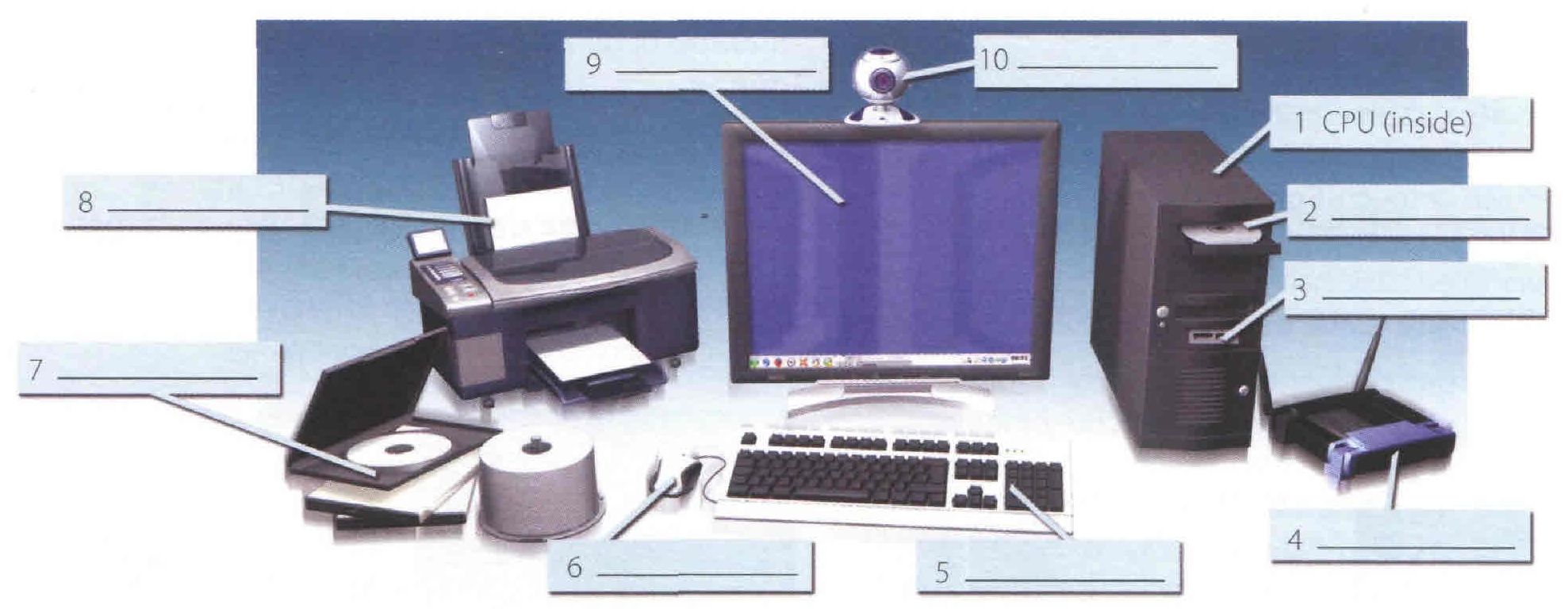
№6. Read the text and label the diagram with the correct terms.
A computer is an electronic machine which can accept data in a certain form, process the data, and give the results of the processing in a specified format as information.
First, data is fed into the computer's memory. Then, when the program is run, the computer performs a set of instructions and processes the data. Finally, we can see the results (the output) on the screen or in printed form.
A computer system consists of two parts: hardware and software. Hardware is any electronic or mechanical part you can see or touch. Software is a set of instructions, called a program, which tells the computer what to do. There are three basic hardware sections: the central processing unit (CPU), main memory and peripherals.
Perhaps the most influential component is the central processing unit. Its function is to execute program instructions and coordinate the activities of all the other units. In a way, it is the 'brain' of the computer. The main memory (a collection of RAM chips) holds the instructions and data which are being processed by the CPU. Peripherals are the physical units attached to the computer. They include storage devices and input/ output devices.
Storage devices (hard drives, DVD drives or flash drives) provide a permanent storage of both data and programs. Disk drives are used to read and write data on disks. Input devices enable data to go into the computer's memory. The most common input devices are the mouse and the keyboard Output devices enable us to extract the finished product from the system. For example, the computer shows the output on the monitor or prints the results onto paper by means of a printer.
On the rear panel of the computer there are several ports into which we can plug a wide range of peripherals - a modem, a digital camera, a scanner, etc. They allow communication between the computer and the devices. Modern desktop PCs have USB ports and memory card readers on the front panel.
| PC system | ||||||
| 1)… programs (graphics package, web browser) | 2)… mechanical and electronic equipment | |||||
| 3)… the “brains” of the computer | Main memory | 4)… physical units attached to the computer | ||||
| 5) … | ROM | 6) … | Output devices | 7) … | ||
| keyboard 8) … | 9) … printer | 10) … DVD drive, flash drive | ||||
№7. Find in the text synonyms to the following words:
classification, information, module, recollection, advices, contain, recent, broad, some
№8. Match these words from the text (1-9) with the correct meanings (a-i).
| software peripherals main memory hard drive (also known as hard disk) hardware input ports output central processing unit (CPU) | a the brain of the computer b physical parts that make up a computer system c programs which can be used on a particular computer system d the information which is presented to the computer e results produced by a computer f input devices attached to the CPU g section that holds programs and data while they are executed or processed h magnetic device used to store information i sockets into which an external device may be connected |
Lesson 11
Software
№1. Write new words:
to direct-управлять
to conduct-проводить
general purpose многоцелевой
to require-требовать
system software системное программное обеспечение
application software-прикладное программное обеспечение
internal –внутренний
to load –загружать
specific- конкретный, определенный
regardless of- несмотря на
to install- устанавливать
to boot-запускать
to develop-развивать, проявлять, разрабатывать
to provide with-обеспечивать чем-либо
to attach – присоединять.
№2. Read and translate the text:
A computer to complete a job requires more than just the actual equipment or hardware we see and touch. It requires Software — programs for directing the operation of a computer or electronic data.
Software is the final computer system component. These computer programs instruct the hardware how to conduct processing. The computer is a general-purpose machine which requires specific software to perform a given task. Computers can input, calculate, compare, and output data as information. Software determines the order in which these operations are performed. Programs usually fall in one of two categories: system software and applications software.
System software controls standard internal computer activities. An operating system, for example, is a collection of system programs that aid in the operation of a computer regardless of the application software being used. When a computer is first turned on, one of the systems programs is booted or loaded into the computers memory. This software contains information about memory capacity, the model of the processor, the disk drives to be used, and more. Once the system software is loaded, the applications software can start to work.
System programs are designed for the specific pieces of hardware. These programs are called drivers and coordinate peripheral hardware and computer activities. User needs to install a specific driver in order to activate his or her peripheral device. For example, if you intend to buy a printer or a scanner you need to worry in advance about the driver program which commonly go along with your device. By installing the driver you «teach» your mainboard to «understand» the newly attached part.
Applications software satisfies your specific need. The programmers nowadays tend to include all kinds of gimmicks in one program to make software interface look more attractive to the user. These class of programs is the most numerous and perspective from the marketing point of view.
№3. Translate from Russian into English:
Завершать работу, управление работой компьютера, электронные данные, конечный компьютерный компонент, проводить обработку, многоцелевая машина, определенное программное обеспечение, данное задание, вводить, считать, сравнивать, выводить данные, определять порядок, системное программное обеспечение, прикладное программное обеспечение, стандартная внутренняя компьютерная деятельность, объем памяти, определенные части оборудования, периферийное оборудование, беспокоиться заранее, устанавливая дисковод, определенная потребность, все виды приманок, более привлекательный, самый многочисленный и перспективный, с точки зрения маркетинга.
№4. Find equivalents in the text:
1. Программное обеспечение – программы для управления работой компьютера или электронными данными.
2. Программное обеспечение определяет порядок выполнения операций.
3. Прикладные программы удовлетворяют вашу потребность.
4. Системное программное обеспечение контролирует стандартные внутренние деятельности компьютера.
5. Программисты сегодня имеют тенденцию включать все виды приманок в одну программу.
№5. Complete the sentences:
1. Software - programs for directing……
2. Computers can ……
3. Software determines ……
4. Programs usually fall in one of two categories ……..
5. System software controls ……
6. An operating system, for example, is a collection …..
7. System programs are designed …….
8. By installing the driver you ……..
9. Applications software satisfies ….
10. These class of programs is …..
№6. Make up the sentences:
| 1. The computer is | a) requires more than just the actual equipment or hardware we see and touch. |
| 2. Software determines | b) your specific need |
| 3. System programs are designed | c) a general-purpose machine which requires specific software to perform a given task. |
| 4. Applications software satisfies | d) for the specific pieces of hardware |
| 5 A computer to complete a job | e) the order in which these operations are performed. |
№7. Answer the questions:
1. What is software?
2. In what two basic groups software could be divided?
3. What is system software for?
4. What is an operating system - a system software or application software?
5. What is application software?
6. What is application software used for?
7. What is the application of the communication software?
№8. Define whether these statements are false or true:
1. Computer programs only instruct the hardware how to handle data storage.
2. System software controls standard internal computer activities.
3. The computer is a general-purpose machine which requires specific software to perform a given task.
4. Computers can only input, calculate data as information.
5. Programs usually fall in one of two categories: system software and applications software.
6. The information about memory capacity, the model of the processor and disk drives is unavailable for system software.
7. The programmers nowadays tend to include all kinds of gimmicks in one program to make software interface look more attractive to the user.
8. These class of programs is not the most numerous and perspective from the marketing point of view.
9. If you intend to buy a printer or a scanner you need to worry in advance about the driver program which commonly go along with your device.
10. Applications software satisfies your specific need.
№9. Which of the following is Software:
1. Program
2. Mouse
3. CPU
4. Web-browser
5. Modem
6. Monitor
7. Operating system
8. Scanner
9. Driver
10. Applications
Lesson 12
Operating Systems
№1. Translate the words:
complex, to consume, consumer, to realize, smart, decade, version, to enhance, top, on top of DOS, compatible, with a click of a mouse, access, to allow, multiple users, simultaneously, to desire, to ship
№2. Read and translate the text:
When computers were first introduced in the 1940's and 50's, every program written had to provide instructions that told the computer how to use devices such as the printer, how to store information on a disk, as well as how to perform several other tasks not necessarily related to the program. The additional program instructions for working with hardware devices were very complex, and time consuming. Programmers soon realized it-would be smarter to develop one program that could control the computer's hardware, which others programs could have used when they needed it. With that, the first operating system was born. Today, operating systems control and manage the use of hardware devices such as the printer or mouse. They also provide disk management by letting you store information in files. The operating system also lets you run programs such as the basic word processor. Lastly, the operating system provides several of its own commands that help you to use the computer.
DOS is the most commonly used PC operating system. DOS is an abbreviation for disk operating system. DOS was developed by a company named Microsoft. MS-DOS is an abbreviation for « Microsoft DOS ». When IBM first released the IBM PC in 1981, IBM licensed DOS from Microsoft for use on the PC and called it PC-DOS. From the users perspective, PC-DOS and MS-DOS are the same, each providing the same capabilities and commands.
The version of DOS release in 1981 was 1.0. Over the past decade, DOS has undergone several changes. Each time the DOS developers release a new version, they increase the version number. Windows NT (new technology) is an operating system developed by Microsoft. NT is an enhanced version of the popular Microsoft Windows 3.0, 3.1 programs. NT requires a 386 or greater and 8 Mb of RAM. For the best NT performance, you have to use a 486 with about 16 Mb or higher. Unlike the Windows, which runs on top of DOS, Windows NT is an operating system itself. However, NT is DOS compatible. The advantage of using NT over Windows is that NT makes better use of the PC's memory management capabilities. OS/2 is a PC operating system created by IBM. Like NT, OS/2 is DOS compatible and provides a graphical user interface that lets you run programs with a click of a mouse. Also like NT, OS/2 performs best when you are using a powerful system. Many IBM-based PCs are shipped with OS/2 preinstalled. UNIX is a multi-user operating system that allows multiple users to access the system. Traditionally, UNIX was run on a larger mini computers to which users accessed the systems using terminals and not PC's. UNIX allowed each user to simultaneously run the programs they desired. Unlike NT and OS/2, UNIX is not DOS compatible.
Most users would not purchase UNIX for their own use. Windows 95 & 98 are the most popular user-oriented operating systems with a friendly interface and multitasking capabilities. The usage of Windows 95 and its enhanced version Windows 98 is so simple that even little kids learn how to use it very quickly. Windows 95 and 98 are DOS compatible, so all programs written for DOS may work under the new operating system. Windows 95 requires 486 with 16 megabytes of RAM or Pentium 75-90 with 40 megabytes of free hard disk space.
№3. Answer the following questions:
1) What problems faced programmers in the 1940's and 1950's?
2) Why first programs were «complex» and «time-consuming»?
3) What are the basic functions of operating system?
4) What does DOS abbreviation mean?
5) What company developed the first version of DOS operating system? For what purpose? Was the new operational system successful?
6) What is the difference between the PC-DOS and MS-DOS?
7) What does the abbreviation NT stand for? Is it DOS-compatible? What are the basic requirements for NT?
8) Who is the developer of OS/2?
9) What makes UNIX so different from the other operational systems?
10) What are the remarkable features of Windows 95?
№4. Fill in the gaps using the words below:
1) Like NT, ... is DOS compatible and provides a graphical user interface that lets you run programs with a click of a mouse.
2)... is the most commonly used PC operating system
3)... is a multi-user operating system that allows multiple users to access the system
4)... is an operating system developed by Microsoft, an enhanced version of the popular
Microsoft Windows programs.
5) The usage of... is so simple that even little kids learn how to use it very quickly.
a) UNIX
b) DOS
c) NT
d) OS/2
e) Windows 95
№5. Decide whether the following statements are true or false in relation to the information in the text:
1) When computers were first introduced in 40s and 50's programmers had to write programs to instruct CD-ROMs, laser printers and scanners.
2) The operational system control and manage the use of the hardware and the memory usage.
3) There are no commands available in operating systems, only word processors.
4) Microsoft developed MS-DOS to compete with IBM's PC-DOS.
5) NT requires computers with 486 CPU and 16 M random access memory.
6) OS/2 is DOS compatible because it was developed by Microsoft.
7) Traditionally, UNIX was run by many users-simultaneously
8) Windows 95 and Windows 98 are DOS compatible and have very «friendly» and convenient interface.
№6. Find the equivalents in the text:
1) Современные операционные системы контролируют использование системного оборудования, например, принтера и мыши.
2) С точки зрения пользователя, операционные системы PC-DOS и MS-DOS идентичны, с равными возможностями и набором системных команд.
3) OS/2 — DOS совместимая операционная система, позволяющая запускать программы при помощи графического интерфейса пользователя.
4) Дополнительные программы для работы с устройствами системного оборудования были очень сложны и поглощали много времени.
5) Операционная система также позволяет запускать программы, такие как простейший текстовый редактор.
6) DOS — наиболее распространенная операционная система для персонального компьютера.
№7. Translate the text "Most Popular Operating Systems”:
Users are drawn to Linux because it is a free and customizable operating system. One can simply download and install it in their device. It also comes with a lot of free useful applications, from productivity (like word processors) to creative applications (like image editing). Since it is under an open source license, this means that users have the freedom to do with it as they wish. They can modify it in any way they think is beneficial and share the modified OS to other users.
MacOS is a family of operating systems developed by Apple Company and is installed in every Mac device. This OS does not offer the same freedom as Linux does to its users. Users need to purchase Mac devices in order for them to use this OS. It is exclusive to their hardware. Users cannot download and install it to their non-Mac device, modify or distribute it. Although this is the case, Mac users still benefit from several pre-loaded, powerful applications that help them accomplish important, everyday tasks. It is also known for its elegant and intuitive user interface design.
Windows, developed by Microsoft company, is one of the most popular and widely-used operating systems in the world. It was originally designed to power personal computers and rival the Macintosh. This OS is not exclusive to Microsoft devices and can run in other machines as well. Like the other operating systems mentioned, Windows also come with useful tools and applications.
№8. Form new words using suffixes and translate them:
customize, use, person, create, power, wide, benefic, free, process, product, applicate, simple, compute, instruct, add, inform, manage, capable, perform, graph.
Additional material
Вебинар для учителей
🎓 Свидетельство об участии ✨БЕСПЛАТНО!✨